

 By rssfeeds-admin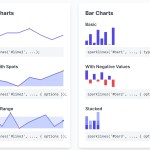
The library is a modern refactor of the original jquery.sparkline.js plugin, rebuilt to work directly with the DOM.
It’s ideal for developers who want to embed simple, dynamic charts in dashboards, tables, or text blocks without a heavy charting library.
Features:
- Seven Chart Types: Line, bar, tristate, discrete, bullet, pie, and box charts.
- Interactive Tooltips: Hover effects display customizable tooltips with value formatting and chart titles.
- Multiple Data Sources: Accepts data from JavaScript arrays, HTML content, attributes, comments, or tag options.
- Composite Charts: Layer multiple sparklines on the same element for comparative visualizations.
- Cross-Browser Rendering: Canvas rendering with VML fallback ensures compatibility across older browsers.
- Custom Events: sparklineClick and sparklineRegionChange events enable interaction handling.
- Range Mapping: Value lookups and threshold highlighting support categorical data display.
- Performance Optimized: Handles large datasets efficiently with minimal rendering overhead.
- Fully Customizable: Colors, sizes, formatting, and styling options for every chart type.
Use Cases:
- Dashboard Metrics: Display compact trend indicators next to KPIs without dedicating full chart space.
- Data Table Enhancement: Embed inline charts within table rows to visualize numeric columns.
- Performance Monitoring: Show server metrics, response times, or error rates as small bar or line charts in monitoring interfaces.
- Financial Data Visualization: Bullet charts communicate performance against targets in executive dashboards, while box plots reveal statistical distributions without requiring full-size chart components.
Basic Usage:
1. Download and load the sparklines.min.js file in your HTML document:
<script src="sparklines.min.js"></script>
2. Call the sparklines() function with a CSS selector for the target element and an array of data. The third argument is an options object.
// A basic line chart inside the #revenue element
sparklines("#revenue", [10, 25, 18, 30, 22], {
 width: "100px",
 height: "40px"
});
3. Custom events fire on user interaction:
document.getElementById("element").addEventListener("sparklineClick", function(e) {
  console.log("Chart clicked!", e.sparklines);
});

document.getElementById("element").addEventListener("sparklineRegionChange", function(e) {
  console.log("Region changed!", e.sparklines);
});
Data Source:
The library can also extract data directly from the HTML. This can be useful for quickly wiring up charts from server-rendered content.
1. HTML content parsing extracts comma-separated values from element text:
<span class="sparkline">4,6,2,8,5,3,7,1</span>

sparklines(".sparkline", null, options);
2. HTML comments hide data from page display:
<span class="sparkline-comment"><!--2,5,8,3,6,9,1,4--></span>

sparklines(".sparkline-comment", null, options);
3. HTML attributes store data in element properties:
<span class="sparkline-attr" values="7,3,9,2,5,8,1,6"></span>

sparklines(".sparkline-attr", null, options);
4. HTML tag options embed configuration directly in markup:
<span class="sparkline" sparkType="bar" sparkBarColor="red">1,2,3,4,5</span>

sparklines(".sparkline", [1, 2, 3, 4, 5], { enableTagOptions: true });
Chart Type Configuration
Line Charts
Line charts connect data points with optional fill areas, highlight spots, and normal range bands:
sparklines("#line-chart", data, {
  // Type of chart to render
  type: "line",

  // Color of the line
  lineColor: "#00f",

  // Color of the filled area
  fillColor: "#cdf",

  // Width of the chart in pixels or CSS value
  width: "auto",

  // Height of the chart in pixels or CSS value
  height: "auto",

  // Color of the spot for the current value
  spotColor: "#f80",

  // Color of the spot when hovering
  highlightSpotColor: "#5f5",

  // Color of the line when hovering
  highlightLineColor: "#f22",

  // Radius of the spot in pixels
  spotRadius: 1.5,

  // Color of the spot for the minimum value
  minSpotColor: "#f80",

  // Color of the spot for the maximum value
  maxSpotColor: "#f80",

  // Width of the line in pixels
  lineWidth: 1,

  // Minimum value for the normal range
  normalRangeMin: undefined,

  // Maximum value for the normal range
  normalRangeMax: undefined,

  // Color of the normal range
  normalRangeColor: "#ccc",

  // Draw the normal range on top of the chart
  drawNormalOnTop: false,

  // Minimum value for the chart range
  chartRangeMin: undefined,

  // Maximum value for the chart range
  chartRangeMax: undefined,

  // Minimum value for the x-axis range
  chartRangeMinX: undefined,

  // Maximum value for the x-axis range
  chartRangeMaxX: undefined,

  // Format for the tooltip
  tooltipFormat: new SPFormat('<span style="color: {{color}}">●</span> {{prefix}}{{y}}{{suffix}}'),
});
Bar Charts
Bar charts display vertical bars with support for negative values, stacking, and zero-axis alignment:
sparklines("#bar-chart", data, {
  // Type of chart to render
  type: "bar",

  // Color of the bars
  barColor: "#3366cc",

  // Color of negative bars
  negBarColor: "#f44",

  // Colors for stacked bars
  stackedBarColor: ["#3366cc", "#dc3912", "#ff9900", "#109618", "#66aa00", "#dd4477", "#0099c6", "#990099"],

  // Color for zero values
  zeroColor: undefined,

  // Color for null values
  nullColor: undefined,

  // Draw the zero axis
  zeroAxis: true,

  // Width of each bar in pixels
  barWidth: 4,

  // Spacing between bars in pixels
  barSpacing: 1,

  // Maximum value for the chart range
  chartRangeMax: undefined,

  // Minimum value for the chart range
  chartRangeMin: undefined,

  // Clip values to the chart range
  chartRangeClip: false,

  // Map of colors for values
  colorMap: undefined,

  // Format for the tooltip
  tooltipFormat: new SPFormat('<span style="color: {{color}}">●</span> {{prefix}}{{value}}{{suffix}}'),
});
Stacked bars require colon-separated value strings:
sparklines("#stacked", ["2:3:1", "1:2:2", "3:1:1", "2:2:3"], {
  type: "bar",
  stackedBarColor: ["#3366cc", "#dc3912", "#ff9900"],
  width: "80px",
  height: "30px"
});
Tristate Charts
Tristate charts visualize positive, negative, and neutral values with distinct colors:
sparklines("#tristate-chart", data, {
  // Type of chart to render
  type: "tristate",

  // Width of each bar in pixels
  barWidth: 4,

  // Spacing between bars in pixels
  barSpacing: 1,

  // Color for positive bars
  posBarColor: "#6f6",

  // Color for negative bars
  negBarColor: "#f44",

  // Color for zero bars
  zeroBarColor: "#999",

  // Map of colors for values
  colorMap: {},

  // Format for the tooltip
  tooltipFormat: new SPFormat('<span style="color: {{color}}">●</span> {{value:map}}'),

  // Lookups for tooltip values
  tooltipValueLookups: { map: { "-1": "Loss", 0: "Draw", 1: "Win" } },
});
Discrete Charts
Discrete charts render vertical lines of varying heights for discrete value representation:
sparklines("#discrete-chart", data, {
  // Type of chart to render
  type: "discrete",

  // Height of the lines
  lineHeight: "auto",

  // Color of the threshold line
  thresholdColor: undefined,

  // Value for the threshold
  thresholdValue: 0,

  // Maximum value for the chart range
  chartRangeMax: undefined,

  // Minimum value for the chart range
  chartRangeMin: undefined,

  // Clip values to the chart range
  chartRangeClip: false,

  // Format for the tooltip
  tooltipFormat: new SPFormat("{{prefix}}{{value}}{{suffix}}"),
});
Bullet Charts
Bullet charts compare performance against targets with qualitative range backgrounds. Data format follows the pattern target, performance, range1, range2, range3:
sparklines("#bullet-chart", data, {
  // Type of chart to render
  type: "bullet",

  // Color of the target line
  targetColor: "#f33",

  // Width of the target line in pixels
  targetWidth: 3,

  // Color of the performance bar
  performanceColor: "#33f",

  // Colors for the ranges
  rangeColors: ["#d3dafe", "#a8b6ff", "#7f94ff"],

  // Base value for the chart
  base: undefined,

  // Format for the tooltip
  tooltipFormat: new SPFormat("{{fieldkey:fields}} - {{value}}"),

  // Lookups for tooltip values
  tooltipValueLookups: { fields: { r: "Range", p: "Performance", t: "Target" } },
});
Pie Charts
Pie charts divide data into proportional slices with configurable colors and borders:
sparklines("#pie-chart", data, {
  // Type of chart to render
  type: "pie",

  // Offset of the chart in degrees
  offset: 0,

  // Colors for the slices
  sliceColors: ["#3366cc", "#dc3912", "#ff9900", "#109618", "#66aa00", "#dd4477", "#0099c6", "#990099"],

  // Width of the border in pixels
  borderWidth: 0,

  // Color of the border
  borderColor: "#000",

  // Format for the tooltip
  tooltipFormat: new SPFormat('<span style="color: {{color}}">●</span> {{value}} ({{percent.1}}%)'),
});
Box Charts
Box charts display statistical quartiles, median, whiskers, and outliers:
sparklines("#box-chart", data, {
  // Type of chart to render
  type: "box",

  // Whether the data is raw or pre-computed
  raw: false,

  // Color of the box line
  boxLineColor: "#000",

  // Color of the box fill
  boxFillColor: "#cdf",

  // Color of the whiskers
  whiskerColor: "#000",

  // Color of the outlier line
  outlierLineColor: "#333",

  // Color of the outlier fill
  outlierFillColor: "#fff",

  // Color of the median line
  medianColor: "#f00",

  // Show outliers
  showOutliers: true,

  // IQR for outlier detection
  outlierIQR: 1.5,

  // Radius of the spot in pixels
  spotRadius: 1.5,

  // Target value
  target: undefined,

  // Color of the target line
  targetColor: "#4a2",

  // Maximum value for the chart range
  chartRangeMax: undefined,

  // Minimum value for the chart range
  chartRangeMin: undefined,

  // Format for the tooltip
  tooltipFormat: new SPFormat("{{field:fields}}: {{value}}"),

  // Key for the tooltip field list
  tooltipFormatFieldlistKey: "field",

  // Lookups for tooltip values
  tooltipValueLookups: {
    fields: {
      lq: "Lower Quartile",
      med: "Median",
      uq: "Upper Quartile",
      lo: "Left Outlier",
      ro: "Right Outlier",
      lw: "Left Whisker",
      rw: "Right Whisker",
    },
  },
});
FAQs:
Q: Can I render sparklines in dynamically loaded content?
A: Call the sparklines function after the DOM elements exist. For content loaded via AJAX or framework rendering, execute sparklines in a callback or lifecycle hook after insertion.
Q: How do I handle responsive sizing when the container changes dimensions?
A: Set width and height to pixel values or use JavaScript to calculate dimensions based on container size before calling sparklines. The library does not automatically redraw on resize. Store your data and options, then re-call sparklines with updated dimensions in a resize handler or resize observer callback.
Q: What causes tooltips to appear in the wrong position or not appear at all?
A: Check that the parent element allows absolute positioning for the tooltip element. The default tooltip class “jqstooltip” needs CSS positioning context. Verify that no CSS transforms or fixed positioning on parent elements interferes with tooltip coordinate calculations. Set a custom tooltipClassname if the default class conflicts with existing styles.
Q: Is it possible to combine a line and bar chart?
A: Yes. The library supports composite charts. You can initialize a sparkline on an element and then call sparklines() again on the same element with composite: true. The second chart will be drawn on top of the first one.
Q: How does the library handle null values in the data?
A: For line charts, null values create a gap in the line. For bar charts, no bar is rendered for a null value. By default, tooltips for null values are skipped, but you can change this with tooltipSkipNull: false.
The post Pure JavaScript Library for Inline Charts – Sparklines.js appeared first on CSS Script.
Discover more from RSS Feeds Cloud
Subscribe to get the latest posts sent to your email.