

 By rssfeeds-admin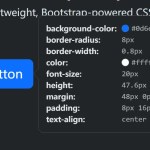
When initialized, it pulls the element’s computed CSS styles and displays them in a clean Bootstrap popover. This makes inspecting styles quick and easy without developer tools.
How to use it:
1. Download and load the CSS Inspector’s script into your Bootstrap project.
<!-- Bootstrap is required -->
<link rel="stylesheet" href="/path/to/cdn/bootstrap.min.css" />
<script src="/path/to/cdn/bootstrap.bundle.min.js"></script>

<!-- Popover CSS Inspector -->
<script src="/path/to/js/popover-css-inspector.min.js"></script>
2. Add the data-bs-custom-class="popover-css-inspector" attribute to the element you want to inspect and the plugin will do the rest.
<button
  type="button"
  class="btn btn-primary btn-lg"
  data-bs-toggle="popover"
  data-bs-custom-class="popover-css-inspector">
  Example Button
</button>
3. By default this plugin will automatically inspect the following CSS properties of the element. You can hide specific CSS properties using the data-css-inspector-hide="PROPERTY NAME" attribute:
- animation-duration
- animation-name
- background-color
- border-radius
- border-width
- color
- font-size
- font-style
- font-weight
- height
- margin
- max-height
- max-width
- opacity
- padding
- text-align
- text-transform
- width
4. You can also add more CSS properties to the CSS inspector using the data-css-inspector-show="PROPERTY NAME" attribute:
- accent-color
- animation
- appearance
- aspect-ratio
- background-image
- background-position
- background-repeat
- background-size
- border
- border-bottom-color
- border-color
- border-left-width
- border-style
- box-shadow
- box-sizing
- color-scheme
- cursor
- display
- float
- font-family
- letter-spacing
- line-break
- line-height
- list-style
- margin-bottom
- margin-left
- margin-right
- margin-top
- min-height
- min-width
- overflow
- padding
- position
- text-align
- text-decoration
- text-indent
- text-shadow
- text-transform
- text-wrap
- transform
- transition
- user-select
- vertical-align
- white-space
- word-break
- word-spacing
- word-wrap
- z-index
Changelog:
04/12/2026
- Update
The post Inspect CSS Styles With Bootstrap Popover CSS Inspector appeared first on CSS Script.
Discover more from RSS Feeds Cloud
Subscribe to get the latest posts sent to your email.