

 By rssfeeds-admin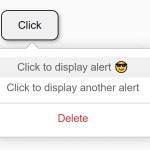
A lightweight JavaScript popup menu library to easily add context menus or dropdowns that open on click or right click of a trigger element.
The popup isn’t just limited to menu items. You can insert any custom elements, making it adaptable to various use cases.
How to use it:
1. Import the Tiny Popup Menu’s JavaScript and Stylesheet.
<link rel="stylesheet" href="/dist/css/tiny-popup-menu.css" />
<script src="/dist/tiny-popup-menu.js"></script>
2. Initiate a new instance of TinyPopupMenu and define your menu items. These items should be structured as a JavaScript array of objects as follows:
const myMenu = new TinyPopupMenu({
      menuItems: [
        {
          content: 'Menu Item 1',
          callback: () => alert('You Clicked Item 1')
        },
        {
          content: 'Menu Item 2',
          callback: () => alert('You Clicked Item 2')
        },
        '-', // separator
        {
          content: 'Menu Item 3',
          callback: () => alert('You Clicked Item 3')
        },
        // ... more items here
      ]
});
3. Enable a button to toggle the popup menu.
myTogglerButton.onclick = function (event) {
  myMenu.open(event);
};
4. Or attach the popup menu to a toggle button programatically.
myMenu.addToggler(myTogglerButton, {
  // options
},
'click' // custom trigger event
);
5. All default options.
const myMenu = new TinyPopupMenu({

      // or 'top'
      position: "bottom",

      // additional CSS class
      className: '',

      // only one popup menu is activated at a time
      autoClose: true,

      // shows arrow indicator
      arrow: true,

      // custom margin
      margin: 5,

      // custom x/y offsets
      offset: {
        x: 0,
        y: 0
      },

      // menu items here
      menuItems: [],

      // prevents the native click event
      stopClick: true

});
6. Events.
// triggered on open
myMenu.on('open', () => console.log('Open event'));

// triggered on close
myMenu.on('close', () => console.log('Close event'));

// triggered on update
myMenu.on('updateposition', () => console.log('Update position event'));
Changelog:
v1.0.11 (05/14/2024)
- Improvements in autoClose, fixed some typos
v1.0.10 (08/03/2024)
- Improved types, added addSeparator helper function
v1.0.9 (09/14/2023)
- Added visibility:hidden to submenu
v1.0.8 (09/14/2023)
- Added hoverable submenu option
- Improved postcss configuration
- Improved some scss variables
The post Customizable Context Menus and Dropdowns With Vanilla JS – Tiny Popup Menu appeared first on CSS Script.
Discover more from RSS Feeds Cloud
Subscribe to get the latest posts sent to your email.