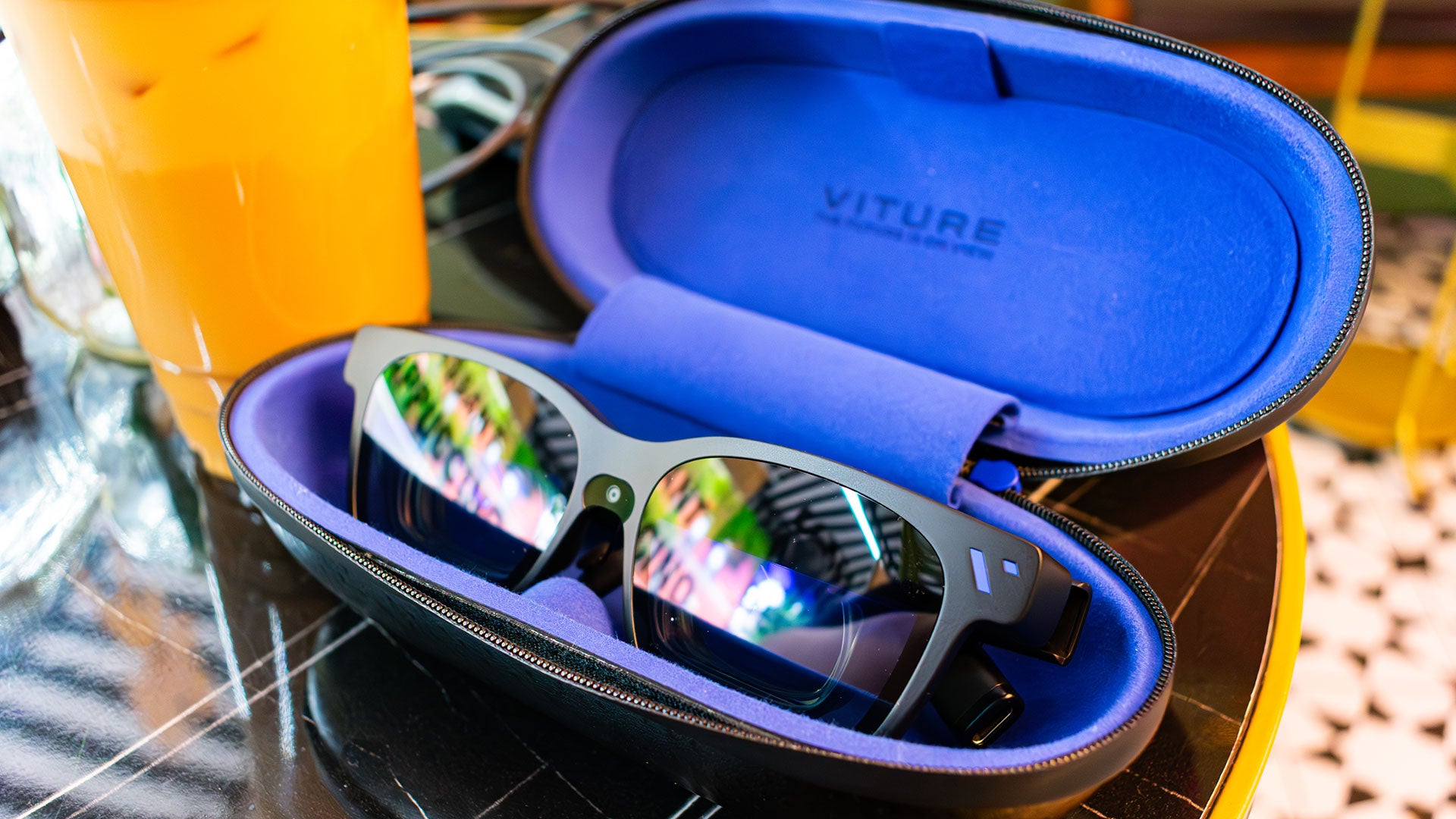
Viture Beast XR Glasses
XR glasses like the Viture Beast have been around for a few years now, but I always saw them as kind of a gimmick. Back when the original Legion Go handheld came out, I tried Lenovo’s first try at the Legion Glasses, and while they were definitely neat, they were fiddly and just ended up giving me a headache. But a lot has changed in the last few years.
The Viture Beast XR glasses deliver the feeling of a gaming headset, but for your eyes. The 1200p combined display looks crisp, and the speakers embedded in the stems, or temples, are good enough that I don’t feel the need to dig out headphones to wear awkwardly on top of them.
But more than anything, these glasses are actually comfortable to wear for more than 10 minutes, which is huge in a world where handheld gaming has blown up as much as it has. Because no matter how good the built-in displays on the Legion Go 2 or the Switch 2 are, nothing quite beats laying back and playing your games on a giant TV that your brain’s been tricked into thinking is on your ceiling.
If you’re not already a handheld gaming sicko, it’s very likely that you’ve never even heard of XR glasses before. Basically, these are glasses with little displays embedded behind each lens, which project a display right in front of your eyes. And because there are two displays so close to your eyes, these glasses essentially trick you into thinking you’re looking at a much larger display than you are.
To be clear, nothing is actually running on these XR glasses. Instead, think of these as a monitor that you can strap to your face, and connect to whichever device you want to use – as long as it supports USB-C display output.
Right off the bat, that means all kinds of devices can use this to expand screen real estate. You can plug it into your phone, a tablet, or even that 14-inch work laptop you’re hunched over all day. All of these devices would benefit from a larger display, and Viture claims the Beast glasses simulate a 174-inch screen on its highest setting. And while I can’t exactly break out a tape measure to check that, it feels accurate.
But the biggest benefit I’ve found for the Viture Beast and other XR glasses has been plugging them into a handheld gaming PC like the Xbox Ally X, especially while traveling. Because, for all the progress that handhelds have made in being comfortable to use over long periods of time, they can still really start to weigh you down, especially during a long flight. With these glasses, though, you can lay your head back and play your games on a giant screen, while just holding your device in your lap.
Even at home, because I don’t have a lot of space for large TVs, I’ve been using these glasses to watch TV or play games on the Xbox Ally X without having to stare at its small 7-inch screen for hours at a time. So while it does still feel like we’re in the early days of XR glasses being a thing, they are only getting more sophisticated over time, and I can see them becoming ubiquitous, especially as portable gaming gets more and more popular.
Right out of the box, Viture’s The Beast glasses look like particularly thick sunglasses. Because of the displays behind each lens, they by necessity need to stick out a bit from your face. I’m sure there’s some way to solve this sometime, but for right now, this makes them look quite dorky.
Even the temples, or stems, of the glasses are quite thick, due to the speakers and all the little buttons worked into each of them. So, while Viture was clearly going for an unassuming aesthetic, it still looks like you’re wearing a device on your face. But, I don’t think that’s necessarily a bad thing, especially if you’re just looking for something to use at home or on the plane.
The front of the glasses has Viture’s ‘V’ logo in the top right corner, along with a camera in between the two lenses. Eventually, Viture claims this camera will be used for spatial computing features, but right now it’s mostly used to help track head movement, so that the display follows your gaze. Luckily, there’s a little sticker sheet of camera covers, and you don’t really lose much by covering it up if having a face-mounted camera makes you uncomfortable.
On the top of each lens is a shroud that partially houses the display behind each lens. This is where each display is actually housed, and it tends to get quite warm while you’re using them. That hasn’t been a problem for me yet, but I expect that using The Beast during a hot summer’s day is going to be miserable. Luckily, airplanes get quite cold, so that should balance out.
Below this shroud is the nosepad, and luckily, it’s interchangeable. The Beast comes with three different options, each for a different size of nose. The goal is to get the glasses to sit as close to your eyes as possible, so that the displays are clear. A lot of times, I’ve noticed that if the glasses slide down my nose, the display will get blurry, which can be a bit headache-inducing.
A lot of that comes down to how the glasses work. The two humps at the top of the glasses house the actual display, which use mirrors to project the display down to each of your eyes. This has the effect of making it look like you’re looking at one giant monitor, instead of two projections of a display. But, the effect lessens the further you are from the prism display.
On the bottom of each of the temples are two buttons, a long button that looks like a volume rocker on any other device, and a short button. By default, the long button on the right controls transparency: turn it all the way down, and you’ll easily be able to make out your environment, making it look like a giant TV is just floating in the room around you.
I prefer to keep this setting turned all the way up, which completely blacks out the area around the projected display, especially when I’m playing games.
The short button on the right side changes the anchor mode of the glasses. You can toggle between a no-depth-of-field option, an anchored option that’ll make the display look like it’s staying in one spot, and a ‘Smooth Follow’ that’ll have the display sit in the center of your field of view when you move your head. The latter of these anchor modes is why the little camera on the front of the glasses is necessary, as it helps track your head’s movements to keep things stable.
Over on the left hand side, the long button adjusts the display brightness. It would have made a lot of sense for Viture to have this rocker adjust volume by default – instead, you have to do a short press on the button in front in order to bring up a volume meter that you can then adjust.
Each of the buttons also does something different when you long-press them, which makes for a dizzying amount of button combinations to memorize. Luckily, when you first plug The Beast glasses in, you’ll be walked through a tutorial that’ll tell you how to use each of the buttons – and it’s even repeatable.
On the far end of each of the temples are directional speakers that Viture says were co-engineered with Harman Kardon. I’ll admit that I went into this expecting these speakers to be awful considering the amount of space they have to work with, but they sound awesome. Even when I’m grinding away in Diablo 4, I can make out all the little sounds of demons perishing to my 10th Sorcerer in three years.
The USB-C cable that connects Viture’s The Beast to whatever device you want to use them with, plugs in on the back of the right temple. Luckily, Viture includes an angled connector, which naturally drapes the cable over your ear, rather than a standard USB-C cable which would jut straight backwards.
My only problem with this cable is the length. When I first started using these glasses I had a vision of plugging them into a gaming laptop on my nightstand and then playing Assassin’s Creed Shadows maxed out while lying in bed and looking at the ceiling. But, with this short cable that’s impossible unless I want to smother a rapidly heating gaming laptop in a mass of blankets.
However, this is a problem that’s solved simply by grabbing a longer cable off of the shelf, so it’s not that big of a deal. Just something to keep in mind.
I haven’t used a ton of XR glasses in the past – after all, they’re a pretty new category – but the Viture Beast is probably the best pair I’ve used so far. Text is mostly readable and the display gets bright and colorful enough that I don’t find myself longing for my monitor after a few minutes.
They’re not perfect, though. There have been a few times where I’m playing a game, and any text that’s on the edges of the display starts to get blurry. Admittedly, this is only really a problem for me, because I’m a hardware sicko that needs to look at a performance overlay at all times when I’m playing games. But there were times when I was playing Vampire Crawlers where the already pixelated text in the corners of the screen was a bit blurry, and it started to give me a headache.
I can’t help but wonder if the blurriness is due to the resolution. A 1200p resolution is fine for a smaller display, but stretched out across a giant TV, text is going to start getting blurry. But, then again the actual display size is quite small, so it could just be down to my narrow IPD (interpupillary distance).
Viture also claims that the Beast glasses feature up to 108% of the Adobe RGB color gamut and peak ‘perceived’ brightness of 1,250 nits. This is something I’d typically measure on a standard gaming monitor with a colorimeter, but that’s not really an option here. I will say, though, that the display does seem to get plenty bright and colorful for watching movies or playing games. But I wouldn’t necessarily recommend them for any kind of creative work.
However bright the glasses do actually get, they do work hard to get there. After using them for a while the top of the glasses gets shockingly warm to the touch. It’s not enough to burn you, and Viture has found a way to make it so that you don’t feel the heat when you’re actually wearing them, but it definitely surprised me when I first took them off after an extended play session.
I said at the top that XR glasses are like ‘gaming headsets but for your eyes.’ For short play sessions, the comparison rings true. But while a good headset can be comfortable for hours on end, XR glasses aren’t quite there yet, but I can see them getting there soon. In the meantime, the Viture Beast XR glasses are a great way to kick back on a flight and play games on a handheld without having to hold up a bulky device the entire way.
Jackie Thomas is the Hardware and Buying Guides Editor at IGN and the PC components queen. You can follow her @Jackiecobra
All eyes are on GTA 6, but Red Dead Redemption 2 continues its remarkable success,…
GTA 6 has gone a whole year without the release of a new trailer. It…
GTA 6 will launch on November 19, 2026, Take-Two has said, reaffirming the announced release…
“The criticism will exist whether I engage with it or not,” actress Lupita Nyong’o has…
Google has released an urgent security update for Chrome, addressing 16 vulnerabilities including two rated…
In a major international law enforcement success, authorities from seven countries dismantled First VPN, a…
This website uses cookies.