

 By rssfeeds-admin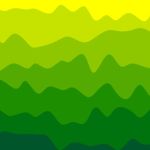
wavery is a simple, lightweight JavaScript library to generate customizable waves using SVG and plain JavaScript.
How
Based on bezier-spline-js library to draw smooth curves passing through given points.
See also:
- Flexible Configurable Waves Animation In Vanilla JavaScript – wavejs
- Generate Animated Waves Using JavaScript And Canvas
How
to use it:
Load the core JavaScript wavery.min.js from the dist folder.
<script src="./dist/wavery.min.js"></script>
Create a container in which you’d like to draw the waves.
<div id="svg"></div>
Create a new Wavery instance and pass the configuration options as follows:
var wavery = new Wavery({
    width: 800,
    height: 600,
    segmentCount: 20,
    layerCount: 10,
    variance: 0.75, // Decimal value between 0 and 1
    strokeWidth: 0,
    strokeColor: "none",
    gradientColors: [
      {
        colorValue: "yellow",
        position: 0
      },
      {
        colorValue: "red",
        position: 0.5
      },
      {
        colorValue: "navy",
        position: 1
      }
    ]
});
Draw the waves in the container element you just created.
var svg = wavery.generateSvg();
var element = document.getElementById("svg");
element.appendChild(svg);
Changelog:
v1.0.8 (02/22/2026)
- Removed DOM dependency.
- Return svg xml string instead of svg element
The post Generate Random SVG Waves Using JavaScript – wavery appeared first on CSS Script.
Discover more from RSS Feeds Cloud
Subscribe to get the latest posts sent to your email.