

 By rssfeeds-admin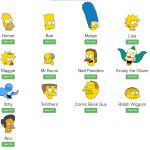
The library generates fully animated characters with blinking eyes without SVG graphics, GIF images, or Canvas rendering.
Each character is constructed through layered div elements styled with precise CSS positioning and animation keyframes.
All Simpson Characters:
- Homer
- Bart
- Marge
- Lisa
- Maggie
- Mr Burns
- Ned Flanders
- Krusty the Clown
- Itchy
- Smithers
- Comic Book Guy
- Ralph Wiggum
- Apu
Use Cases:
- Fan Sites and Tribute Pages: Add iconic characters like Homer, Bart, or Marge to a fan community site or blog.
- CSS Learning: This library is a masterclass in advanced CSS. It shows how to use borders, transforms, and absolute positioning to create complex shapes.
- Playful UI/UX Elements: Use a character like Krusty the Clown or Comic Book Guy as a unique loading indicator, 404 page mascot, or interactive guide.
How To Use It:
1. Download the package and include the CSS file for the specific character you want to display. If you only need Bart, do not include the other files.
<link href="css/apu.css" rel="stylesheet">
<link href="css/bart.css" rel="stylesheet">
<link href="css/comicbookguy.css" rel="stylesheet">
<link href="css/homer.css" rel="stylesheet">
<link href="css/itchy.css" rel="stylesheet">
<link href="css/krusty.css" rel="stylesheet">
<link href="css/lisa.css" rel="stylesheet">
<link href="css/maggie.css" rel="stylesheet">
<link href="css/marge.css" rel="stylesheet">
<link href="css/mr-burns.css" rel="stylesheet">
<link href="css/ned-flanders.css" rel="stylesheet">
<link href="css/ralph-wiggum.css" rel="stylesheet">
<link href="css/sideshow-mel.css" rel="stylesheet">
<link href="css/smithers.css" rel="stylesheet">
2. Add a Simpsons character to your page by inserting the corresponding HTML structure. Here is the complete structure for Bart Simpson:
<div id="bart">
  <div class="head">
    <div class="no-border body hair hair1"></div>
    <div class="no-border body hair hair2"></div>
    <div class="no-border body hair hair3"></div>
    <div class="no-border body hair hair4"></div>
    <div class="no-border body hair hair5"></div>
    <div class="no-border body hair hair6"></div>
    <div class="no-border body hair hair7"></div>
    <div class="no-border body hair hair8"></div>
    <div class="no-border body hair hair9"></div>
    <div class="body mouth-lip2"></div>
    <div class="no-border body head-left1"></div>
    <div class="no-border body head-left2"></div>
    <div class="no-border body head-left3"></div>
    <div class="no-border body head-left4"></div>
    <div class="no-border body head-left5"></div>
    <div class="no-border body head-left6"></div>
    <div class="no-border body head-left7"></div>
    <div class="body eyelid"></div>
    <div class="no-border body mouth"></div>
    <div class="body mouth-lip"></div>
    <div class="no-border body head-right2"></div>
    <div class="no-border body head-right1"></div>
    <div class="no-border body head-right3"></div>
    <!-- The ear -->
    <div class="body ear">
      <div class="no-border inner1"></div>
      <div class="no-border inner2"></div>
      <div class="no-border body clip"></div>
    </div>
    <!-- The right eye -->
    <div class="right-eye">
      <div class="no-border right-eye-pupil"></div>
      <div class="no-border body eyelid-top"></div>
      <div class="no-border body eyelid-bottom"></div>
    </div>
    <!-- The nose -->
    <div class="no-border body nose"></div>
    <div class="body nose-tip"></div>
    <!-- The left eye -->
    <div class="left-eye">
      <div class="no-border left-eye-pupil"></div>
      <div class="no-border body eyelid-top"></div>
      <div class="no-border body eyelid-bottom"></div>
    </div>
    <div class="no-border mouth-smile"></div>
  </div>
</div>
3. Each character follows a similar component-based structure:
- Main container div with character ID
- Head wrapper containing all facial components
- Eye structures with separate pupil and eyelid elements
- Facial features (nose, mouth, ears) as individual divs
- Hair or distinctive features as multiple positioned elements
4. Available Characters and CSS Files
| Character | CSS Filename |
|---|---|
| Homer Simpson | homer.css |
| Bart Simpson | bart.css |
| Marge Simpson | marge.css |
| Lisa Simpson | lisa.css |
| Maggie Simpson | maggie.css |
| Mr. Burns | mr-burns.css |
| Ned Flanders | ned-flanders.css |
| Krusty the Clown | krusty.css |
| Itchy | itchy.css |
| Smithers | smithers.css |
| Comic Book Guy | comicbookguy.css |
| Ralph Wiggum | ralph-wiggum.css |
| Apu | apu.css |
5. This library uses pure CSS with no JavaScript configuration. You can customize the characters by modifying CSS properties directly in the stylesheets.
- Animation Timing: Modify the animation-duration and animation-delay properties in the eyelid classes to adjust blink frequency and timing.
- Character Size: Adjust the font-size property on the character’s root container ID to scale the entire character proportionally.
- Color Scheme: Override the background-color and border-color properties in the CSS files to change character colors.
- Position: Use standard CSS positioning properties (top, left, transform) on the character container to place characters anywhere on the page.
- Visibility: Apply display or opacity properties to show or hide characters dynamically.
FAQs:
Q: How do I change the size of a character without distorting proportions?
A: Apply a font-size property to the character’s root container (the div with the character’s ID). All child elements use em-based sizing that scales proportionally. For example, #bart { font-size: 150%; } increases Bart’s size by 50% while maintaining all proportions.
Q: Can I use multiple instances of the same character on one page?
A: The default implementation uses ID selectors, which only allow one instance per page. To use multiple instances, convert the CSS selectors from IDs to classes. Change #bart to .bart in the CSS file and use class=”bart” instead of id=”bart” in your HTML. Then you can add as many instances as needed.
Q: Can I change the skin color?
A: Yes. Since it is pure CSS, you can override the background color classes. You would need to inspect the CSS file (e.g., bart.css) and find the class defining the yellow skin color, then overwrite it in your own stylesheet.
Changelog:
12/02/2025
- Update doc & demo
The post Simpsons Characters in Pure CSS (No SVG & Canvas) appeared first on CSS Script.
Discover more from RSS Feeds Cloud
Subscribe to get the latest posts sent to your email.